Centering Text for Quarto PDFs
Format Supported: PDF (LaTeX)
Solution
:::{.center data-latex=""}
Centered and **bolded** text with _italics_
:::
If you want the centered text to match the font style of the headings.
Video
Discussion
Quarto has no built-in way to center plain text in PDF output. You can, however, center text using a couple of approaches.
Raw LaTeX
One option is to use LaTeX environments to do that:
\begin{center}
This text is centered!
\end{center}
The problem is that when inside a LaTeX environment like the above, you can no longer use Quarto’s built-in formatting options such as **bold**. See Figure 36.1.
\begin{center}
**This text is centered!**

But it is not bolded.
\end{center}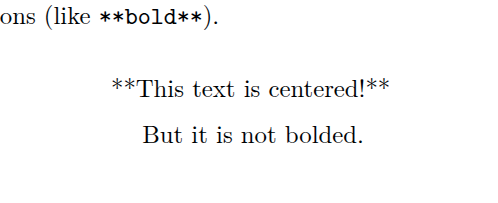
Fenced Div
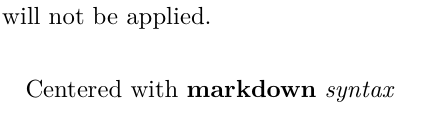
A better option is to use a fenced div. These begin with ::: and end with :::. When you nest one div inside another, the outer div needs more colons than the inner one: ::::, :::::, and so on. The most important part is to ensure that you include the data-latex="" attribute; see Figure 36.2. You will not receive an error if you omit it, but the centering will not be applied: data-latex="" tells Quarto to emit a plain LaTeX center environment for the div, and without it Quarto’s default div output leaves the text left-aligned.
:::{.center data-latex=""}
Centered with **markdown** _syntax_
:::
Centered Header Text
:::{.center data-latex=""}
\usekomafont{disposition}\usekomafont{subsection}
Centered and same font-style as Quarto headers
:::
Changing the font size is a bit tricky, but it can be done with some LaTeX syntax inside the fenced div.
\Large\(\approx\)#\large\(\approx\)##\normalsize\(\approx\)###
The problem with using \Large and related followed by using **...** for bold is that the font style is not the same as “regular” Quarto headers.
For example, see Figure 36.3 where we can see the difference in font style between the first and second lines. In particular, focus on the italicized word, “syntax”.
:::{.center data-latex=""}
\large
**Centered with markdown _syntax_**
:::

## Centered with markdown _syntax_

:::{.center data-latex=""}
\usekomafont{disposition}\usekomafont{subsection}
Centered with markdown _syntax_
:::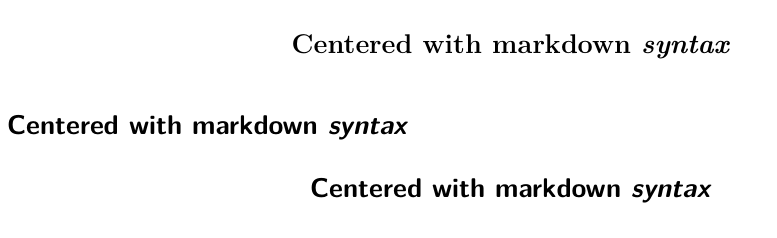
##; a Quarto heading using ##; centered text using the same font-style as ##
In order to obtain the same font-style as the headings, we have to use the following line above the header text:
\usekomafont{disposition}\usekomafont{subsection}(The \usekomafont{...} commands come from KOMA-Script. They work here because Quarto’s default PDF document class is scrartcl, so they may not if you have set a custom documentclass.)
Acknowledgements
- Claude Opus 5.5 helped with formatting the HTML page and provided information on Quarto syntax.
- Qwen3.8-27B managed the project repository and edited the video to trim the beginning and end, adjust the volume, and speed up sections.
- GLM-5.3-Flash provided information on Quarto syntax and checked for clarity once the document was completed. Several suggestions were implemented to improve the document flow.